In today’s fast-evolving fashion world, digital illustration is transforming how designers bring their visions to life. Whether you’re a seasoned artist or just stepping into the creative realm, mastering digital fashion illustration opens up endless possibilities for innovation and personal expression.
With cutting-edge tools and techniques reshaping the industry, now is the perfect time to dive in and elevate your art. Join me as we explore insider tips and creative secrets that will help you craft stunning pieces tailored for the modern wardrobe.
Ready to unlock your digital fashion potential? Let’s get started!
Choosing the Right Software for Your Fashion Illustration Journey
Exploring Popular Digital Tools
When I first dipped my toes into digital fashion illustration, the sheer number of software options felt overwhelming. From Adobe Illustrator’s precision vector tools to Procreate’s intuitive brush engine on the iPad, each program offers something unique.
Illustrator shines when you want clean lines and scalability, perfect for technical flats or detailed garment construction. On the other hand, Procreate delivers a more organic feel, making it ideal for sketching fluid silhouettes and adding painterly textures.
My advice? Try a few trial versions before settling on the one that feels most natural to your workflow and style. This hands-on exploration saved me hours of frustration and helped me find the perfect match.
Balancing Features with Usability
It’s easy to get dazzled by software boasting endless features, but usability should be your top priority. For instance, I found that some programs have a steep learning curve that slowed my creative process instead of enhancing it.
Tools like Clip Studio Paint strike a nice balance, offering powerful brush customization and vector capabilities without feeling cluttered. Remember, the goal is to let your creativity flow, not get bogged down by complicated menus or unintuitive controls.
Look for features like layering, brush variety, and color management that support your specific fashion illustration needs while keeping the interface user-friendly.
Hardware Considerations That Impact Your Art
Digital art isn’t just about software; the hardware you use can significantly affect your experience and output quality. I started on a basic tablet but quickly upgraded to a drawing monitor with pressure sensitivity and tilt recognition, which made a noticeable difference in line quality and shading depth.
If you’re serious about digital fashion illustration, investing in a good stylus and a high-resolution screen pays off. Keep in mind portability too—if you travel or sketch on the go, a tablet like the iPad Pro offers both power and convenience.
Balancing budget and performance is key, but remember, your tools should enhance your artistic expression, not limit it.
Mastering Color and Texture to Elevate Your Designs
Understanding Color Theory in Fashion Illustration
Color is a language in fashion design, and mastering it digitally can transform a simple sketch into a captivating story. Early in my journey, I underestimated how vital color harmony and contrast were to conveying mood and fabric quality.
Experimenting with complementary and analogous palettes helped me create depth and emphasis in my illustrations. Digital tools allow you to easily tweak hues, saturation, and brightness, so don’t hesitate to play around until you find a combination that resonates with the garment’s intended vibe.
Remember, color choices can influence how your design is perceived—bold reds can evoke passion, while muted pastels might suggest softness and elegance.
Simulating Fabric Textures Digitally
One challenge I faced was making digital illustrations feel tactile—capturing the essence of silk’s sheen or denim’s roughness isn’t straightforward on a flat screen.
Layering different brush textures and playing with opacity settings became my go-to method for simulating fabric surfaces. Many digital art programs offer custom brushes designed to mimic textiles like lace, leather, or knitwear, which can add realism and interest.
Additionally, incorporating subtle gradients and highlights can suggest the way light interacts with materials, making your designs pop. It takes patience and observation, but once you get the hang of it, your digital pieces will carry that authentic fabric feel.
Creating Mood Boards to Inspire Palette Choices
Before jumping into illustration, I started compiling mood boards filled with color swatches, fabric photos, and runway shots. This practice helped me stay focused and consistent throughout my design process.
Digital mood boards are easy to assemble using platforms like Pinterest or Adobe Spark, where you can curate and rearrange visuals until the palette feels just right.
Having a reference guide on hand prevents last-minute color clashes and keeps your collection cohesive. Plus, sharing mood boards with clients or collaborators streamlines communication, ensuring everyone’s on the same page about the creative direction.
Refining Your Line Work and Silhouette Representation
Techniques for Clean, Expressive Lines
One of the first hurdles in digital fashion illustration is mastering line work that’s both precise and lively. Initially, I struggled with stiff, mechanical strokes that lacked personality.
Over time, I learned to use pressure sensitivity and varying brush sizes to inject energy and movement into my lines. Sometimes, starting with loose sketches before refining helps maintain spontaneity.
Zooming in to perfect details without losing the overall flow became a game changer. Also, utilizing vector paths for parts needing sharp edges, like collars or seams, ensures crispness.
Balancing freehand fluidity with technical accuracy makes your illustrations believable and engaging.
Capturing Dynamic Poses and Movement
Fashion is all about how clothes interact with the body in motion, so your illustrations should reflect that vitality. I found studying real-life models, dancers, and athletes invaluable for understanding weight distribution and fabric drape.
Gesture drawing exercises helped me loosen up and capture the essence of movement quickly. Digitally, layering sketches allows you to experiment with different poses and tweak proportions without starting over.
Remember, a static pose can feel lifeless; subtle shifts in stance or limb positioning breathe life into your designs and help viewers imagine the clothes in action.
Balancing Detail and Simplicity in Silhouettes
Sometimes less is more, especially when illustrating fashion silhouettes. Early on, I overloaded my designs with intricate details, which cluttered the image and distracted from the overall shape.
Learning to emphasize the silhouette’s flow and form first made a huge difference. I often block out the major shapes in solid colors or simple shading before layering in textures and embellishments.
This approach ensures the core design reads clearly at a glance, which is crucial for presentations or portfolios. Striking the right balance between detail and clarity keeps your artwork professional and visually appealing.
Integrating Accessories and Styling Elements Seamlessly
Highlighting Accessories Without Overpowering
Accessories can make or break a fashion illustration, adding personality and context to the look. When I started, I tended to draw accessories with the same intensity as the garments, which sometimes overwhelmed the composition.
Now, I approach accessories like a seasoning—used sparingly to complement rather than dominate. Playing with scale, color contrast, and placement helps keep the focus balanced.
For example, a bold handbag or statement earrings can draw attention without overshadowing the outfit’s silhouette. It’s all about harmony and storytelling through details.
Layering Techniques for Complex Styling
Creating layered outfits digitally can be tricky, especially when different fabrics and accessories overlap. I discovered that working with multiple layers in your art software is essential for managing complexity.
Naming and organizing layers by garment type (e.g., outerwear, tops, bottoms, accessories) saves time and reduces confusion. Using clipping masks and blending modes can help simulate transparency and fabric interplay realistically.
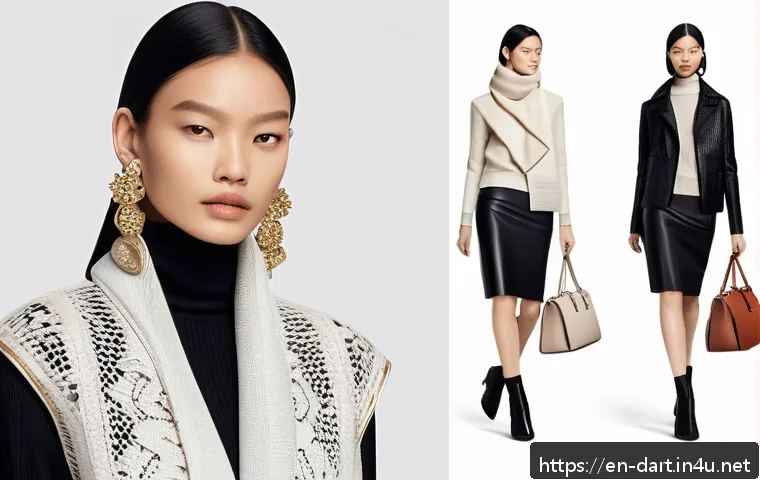
This method also makes editing easier—if you want to adjust a jacket’s color or move a belt, you don’t have to redo the whole illustration. Mastering layering boosts both efficiency and creative control.
Using Color and Texture to Define Styling Choices
Styling is not just about shapes but also how colors and textures interact to create a cohesive look. When I illustrate styled ensembles, I pay close attention to color harmony between garments and accessories, ensuring they complement rather than clash.
Texture contrast also plays a big role—pairing matte fabrics with shiny accents or soft knits with structured leather adds visual interest. Digital tools let you experiment freely here; you can try different combinations quickly and see how they affect the overall vibe.
Thoughtful styling choices make your illustrations feel polished and fashion-forward.
Leveraging Digital Techniques for Efficient Workflow
Setting Up Templates and Reusable Assets
Efficiency is a game changer when working on multiple fashion illustrations or collections. I began creating templates for body poses, garment flats, and common details that I can reuse and modify.
This not only speeds up the process but ensures consistency across pieces. For example, having a base croquis with adjustable limbs lets me focus on design variations rather than redrawing the figure each time.
Similarly, saving brushes and color swatches tailored to your style streamlines daily work. These reusable assets become invaluable as your workload grows and deadlines tighten.
Utilizing Shortcuts and Automation Features
Once you get comfortable with your software, learning keyboard shortcuts and automation tools can save a surprising amount of time. I remember how much smoother my sessions became after mastering commands like undo/redo, layer duplication, and quick selection.
Some programs also offer features like pattern generation or fabric simulation that automate repetitive tasks. Take advantage of these to reduce manual effort and keep your focus on creative decisions.
The less time spent on technical hassles, the more energy you have to refine your designs.
Backing Up and Organizing Your Work
Digital work is vulnerable to data loss or accidental overwrites, so developing a solid backup and organization routine is crucial. I use cloud storage combined with local backups to safeguard my files, naming them systematically by date, project, and version.
This habit saved me from panic more than once when hardware issues or software crashes occurred. Additionally, keeping your workspace tidy with clearly labeled folders and layers makes revisiting older projects much easier.
Good digital hygiene not only protects your creations but also supports a stress-free creative process.
Understanding Industry Standards and Presentation Techniques
Adapting Your Work for Different Platforms
Fashion illustrations today are showcased across diverse platforms—from Instagram reels to e-commerce websites—each demanding specific formats and resolutions.
Early on, I learned the hard way that an illustration optimized for print might look blurry on social media if not resized properly. Understanding the requirements for each platform ensures your work always shines.
For example, high-resolution PNGs work well for detailed portfolios, while JPEGs with optimized compression suit web galleries. Tailoring your files prevents quality loss and helps maintain professionalism.
Creating Impactful Presentation Boards
A well-crafted presentation board can elevate your fashion illustrations by contextualizing them within a collection or concept. I enjoy combining sketches, fabric swatches, color palettes, and inspirational imagery to tell a compelling story.
Digital tools let you easily arrange and resize elements, adding text annotations or branding. This holistic approach not only impresses clients and buyers but also clarifies your design vision.
When presenting, clarity and cohesiveness matter just as much as artistic flair.
Keeping Up with Emerging Trends and Technologies
The fashion illustration landscape is constantly evolving with new software updates, AI-assisted design tools, and virtual reality applications. Staying curious and adaptable has been vital in my own growth.
I regularly follow industry blogs, attend webinars, and experiment with new features to keep my skills sharp. Embracing innovation doesn’t mean abandoning traditional techniques; rather, it enhances your toolkit and opens fresh creative avenues.
Being proactive about trends ensures your work remains relevant and competitive in the fast-paced fashion world.
| Software | Best For | Key Features | Learning Curve | Price |
|---|---|---|---|---|
| Adobe Illustrator | Vector precision and technical flats | Pen tool, scalable graphics, color swatches | Moderate to high | Subscription-based (~$20.99/month) |
| Procreate | Freeform sketching and painterly effects | Custom brushes, layering, Apple Pencil support | Low to moderate | One-time purchase (~$9.99) |
| Clip Studio Paint | Versatile illustration with vector and raster | Brush customization, vector layers, animation | Moderate | One-time purchase (~$49.99) or subscription |
| CorelDRAW | Graphic design and fashion flats | Vector tools, layout options, color management | Moderate | Subscription or one-time purchase |
| Affinity Designer | Affordable alternative for vector and raster | Non-destructive editing, advanced grids | Low to moderate | One-time purchase (~$54.99) |
Closing Thoughts
Choosing the right software and tools can truly transform your fashion illustration journey. By balancing features with usability and understanding your hardware needs, you set yourself up for creative success. Remember, mastering color, texture, and styling elevates your designs to a professional level. Keep experimenting, stay organized, and embrace emerging trends to keep your work fresh and inspiring.
Helpful Tips to Remember
1. Always test multiple software options through trials to find what suits your style and workflow best.
2. Prioritize user-friendly interfaces over feature overload to maintain a smooth creative process.
3. Invest in quality hardware like a pressure-sensitive stylus and high-resolution display to enhance your digital art experience.
4. Use mood boards and reusable templates to streamline your design process and maintain consistency.
5. Keep your digital files organized and backed up regularly to avoid losing valuable work.
Key Takeaways
Finding the right balance between technical tools and creative freedom is essential in fashion illustration. Focus on software that complements your skills without overwhelming you, and choose hardware that supports precision and comfort. Understanding color theory and texture simulation helps bring your designs to life, while efficient workflow practices save time and reduce stress. Finally, adapting your work for different platforms and staying updated with industry trends ensures your illustrations remain relevant and impactful.
Frequently Asked Questions (FAQ) 📖
Q: uestions about Digital Fashion IllustrationQ1: What are the essential tools I need to start digital fashion illustration?
A: To begin your journey in digital fashion illustration, you’ll want a reliable tablet or touchscreen device paired with a stylus—brands like Wacom or the iPad Pro with Apple Pencil are popular choices.
Software-wise, programs such as Adobe Illustrator, Procreate, or Clo3D offer powerful features tailored for fashion design. From personal experience, starting with Procreate on an iPad is both intuitive and budget-friendly, especially for beginners.
Remember, the right tools can make the creative process smoother but don’t stress about having the most expensive gear right away—mastering fundamentals matters more.
Q: How can I develop my unique style in digital fashion illustration?
A: Developing a unique style takes time and experimentation. I found that immersing yourself in various art styles, studying fabric textures, and observing real-life fashion helps build a personal aesthetic.
Try mixing traditional sketching techniques with digital effects to see what resonates with you. Also, regularly sharing your work and seeking feedback within creative communities can spark new ideas and refine your approach.
Don’t rush—your style will naturally evolve as you gain confidence and explore different themes and tools.
Q: What are some tips for making digital fashion illustrations look realistic and appealing?
A: Achieving realism in digital fashion illustrations involves attention to detail and understanding fabric behavior. I recommend focusing on light and shadow to give depth to your designs, using layers to separate elements like clothing, accessories, and textures.
Playing with color gradients and highlights can make fabrics look more lifelike. Additionally, referencing photographs or real garments helps capture accurate proportions and draping.
Practicing anatomy basics ensures your figures move naturally, making the overall illustration more convincing and engaging.