Hey fellow digital artists! There’s something undeniably captivating about metal, isn’t there? Whether it’s the sleek, futuristic gleam of a sci-fi spaceship or the rustic, worn patina on ancient armor, getting that metallic look just right in our digital masterpieces can feel like a real challenge.

I know I’ve spent countless hours tweaking settings and finessing brushstrokes, all in pursuit of that perfect reflective shine or gritty, textured surface.
It’s more than just a color; it’s about understanding how light plays, how materials react, and bringing that sense of tangible realism to our screens.
With the incredible push for hyper-realistic graphics in games and the breathtaking detail we see in animated films, mastering digital metal has become a superpower for any artist.
I’ve personally experimented with nearly every trick in the book, discovering what truly makes digital metal pop, and I’m so excited to share all my best insights with you today.
Are you ready to elevate your art with stunning, convincing metal textures? Let’s uncover the secrets to making your digital creations truly shine.
Alright, let’s dive into the captivating world of creating realistic metal textures in digital art! Here’s how you can elevate your work:
Understanding Light and Reflection on Metal
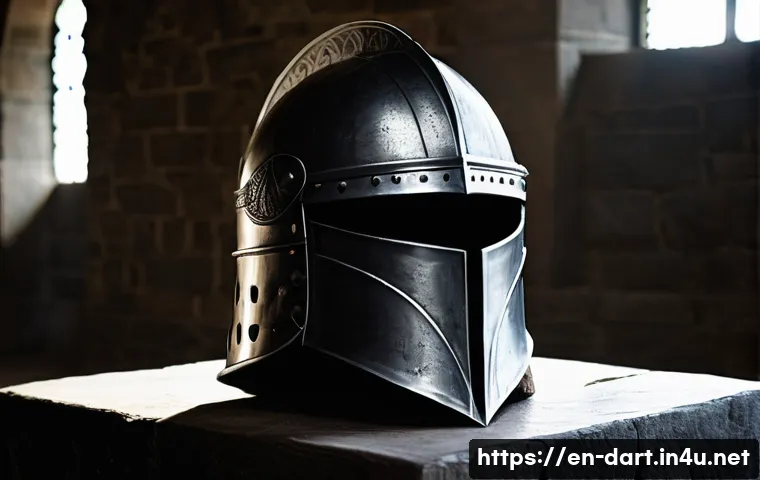
Before we start with specific techniques, let’s get the basics down. Metals are unique because of how they reflect light. * Specular Highlights: These are the bright, focused reflections that give metal its shine.
The intensity and sharpness of these highlights can suggest different finishes, such as matte or glossy. * Shadows: Metallic surfaces also have areas of deep shadow, creating contrast and enhancing the three-dimensional appearance.
Key Steps to Digital Metal Mastery
Here’s a breakdown of essential techniques to make your digital metal creations truly shine:
1. Base Color and Value
* Choosing the Right Base: Start by picking a base color that matches the metal you want to depict (gold, silver, steel, etc.). When picking any sort of gray, try and make it just slightly blue.
* Establishing Light and Shadow: Observe the light source and how it hits the metal. Use shading to create contrast between light and shadow, ensuring smooth transitions to create dimensionality.
2. Adding Highlights and Reflections
* Intense Highlights: Add crisp, bright highlights where light hits the surface most directly. These reflections should appear as small, intense spots or streaks.
* Environmental Reflections: Include subtle reflections of nearby objects or colors to make the texture more believable. For polished metals, reflections are sharp and clear; for rougher metals, they’re softer and more diffused.
3. Texturing for Realism
* Imperfections: Add small details like cracks, scratches, or textures in the transitions between light and shadow to avoid a “fake” look. * Variations: Use variations of the same metal texture with slight adjustments to roughness and specularity to make metals look more dynamic.
4. Creating Depth and Dimension
* Exaggerate Differences: Exaggerate the differences between reflective and other types of surfaces to suit your artwork. * Sharp Highlights: Use sharp highlights to make a surface look smoother and more polished.
5. Color and Finish
* Color choices: Consider the color of your light source and how it will affect the color of the metal. * Finishes: Adjusting the sharpness and brightness of highlights allows artists to differentiate between types of metals.
6. Adding Wear and Tear
* Scratches and Dents: Add small defects and roughness with a texture brush. Use a darker shade for deep dents and scratches, and highlight edges exposed to light with a lighter shade.
* Edge Wear: Apply wear to edges based on a curvature map. Adjust the wear level and contrast to achieve the desired effect.
7. Software and Tools
* Digital Painting Software: Programs like Adobe Photoshop, Clip Studio Paint, and Procreate are popular choices for digital metal art. * Brushes: Experiment with brushes like “Metallic” or “Metallic Shine” to achieve different effects and textures.
Common Pitfalls to Avoid
* Overusing Pure White: Pure white is rare in nature and should be reserved for focused light sources. * Getting Stuck on Brushes: Don’t rely too heavily on specific brushes; focus on mastering the fundamentals of form, light, and shadow.
* Too Many Saturated Colors: Most natural things have a muted saturation, so avoid overusing strong colors from the color wheel.
Metal Art Table
Here’s a handy table summarizing key aspects of creating different metal types:| Metal Type | Base Color | Highlights | Shadows | Texture/Details |
| :———– | :——————- | :——————————– | :—————————— | :———————————————— |
| Steel | Gray with blue tint | Crisp, white | Dark gray, ব্লueish | Subtle scratches, imperfections |
| Gold | Warm, saturated yellow | Bright, high sheen | Hue shift to brown/reddish tones | Smooth transitions, subtle reflections |
| Silver | Light gray | Sharp, clear, almost white | Darker gray | Smooth, detailed reflections |
| Rusty Iron | Dark orange-brown | Muted, scattered | Deep brown, almost black | Rust spots, rough edges, uneven transitions |
| Brushed Metal| Gray or tinted color | Soft, diffused, elongated streaks | Gradual, blended | Fine, directional scratches |I hope these insights help you take your digital metal art to the next level!
Wrapping Things Up
And there you have it, fellow digital artists! I truly hope these tips and tricks help you transform your metal creations from flat to fantastic. Honestly, when I first started out, achieving that realistic gleam felt like a magical feat, but with practice and by truly understanding how light plays on surfaces, it becomes incredibly rewarding. Don’t be afraid to get your hands “dirty” with experimentation. Dive in, play with reflections, scuffs, and shines, and watch your digital art come alive. The journey of mastering digital textures is a continuous one, and every brushstroke brings you closer to your artistic vision. Keep creating, keep learning, and most importantly, keep having fun!
Useful Information to Keep in Mind
1. Observe the Real World: Seriously, one of the biggest game-changers for me was simply paying more attention to how light interacts with metal in everyday life. Look at a spoon, a car fender, or even a piece of jewelry. Notice where the highlights hit, how shadows fall, and the subtle reflections from the environment. This observational practice is invaluable for building your visual library and truly understanding the physics behind those stunning metallic effects.
2. Practice Fundamental Lighting: Before you even dive into fancy brushes, make sure you’ve got a solid grasp of basic lighting principles. Understanding your light source, ambient light, and bounced light will give you a rock-solid foundation. Once you know how light works universally, applying it to the unique properties of metal becomes so much easier and more intuitive. It’s like learning your scales before tackling a concerto!
3. Experiment with Layer Modes and Blending: Don’t just stick to “Normal” mode! Explore different layer blending modes like “Screen,” “Overlay,” “Soft Light,” or “Linear Dodge (Add)” for your highlights and reflections. Each mode offers a unique way to integrate light and color, allowing you to achieve a vast array of metallic finishes, from subtle sheen to blinding polish. You’d be surprised what magic you can create by simply adjusting a layer’s blend mode and opacity.
4. Seek and Give Constructive Feedback: The creative community is a treasure trove of insights. Share your work in progress with fellow artists and be open to their critiques. Sometimes a fresh pair of eyes can spot something you’ve missed, or offer an alternative perspective that unlocks a new technique for you. And don’t forget to pay it forward! Helping others also solidifies your own understanding and keeps the creative spirit flowing. It’s a fantastic way to grow.
5. Invest in Quality Resources (Wisely!): While practice is key, don’t shy away from investing in high-quality tutorials, custom brush packs, or even a digital art course if you feel stuck. There are so many incredible artists sharing their knowledge out there, and sometimes learning a specific workflow or technique from a seasoned pro can accelerate your learning curve significantly. Just make sure the resources align with your learning style and specific artistic goals – a little research goes a long way before you spend your hard-earned cash!
Key Takeaways
To truly nail digital metal textures, remember that it’s all about understanding and manipulating light and reflection. Start with a thoughtful base color, then carefully build up your highlights, shadows, and environmental reflections, adjusting their intensity and sharpness to define the metal’s finish. Don’t shy away from adding imperfections and wear and tear; these subtle details are what breathe life into your creations and make them feel genuinely real. Software and brushes are tools, but your keen eye for observation and a solid grasp of fundamentals are your true superpowers. Keep practicing, keep experimenting, and you’ll be crafting breathtaking digital metal in no time!
Frequently Asked Questions (FAQ) 📖
Q: s about creating digital metal textures, written as if from a friendly, experienced English-speaking digital art blogger:Q1: What’s the biggest secret to making digital metal look realistic?
A: Honestly, it’s all about the highlights and reflections! Real metal is super reflective, so you need to nail how light interacts with the surface. Think about where your light source is, and really exaggerate those bright spots.
Pay attention to the environment you’re depicting, too. A city scene will have tons of different colors reflecting, while a forest scene will give you softer greens and browns.
Also, don’t be afraid to use reference photos! I often grab photos of real metal objects under different lighting conditions to get a feel for how the highlights and shadows really behave.
I’ve found that adding subtle color variations within the reflections also kicks up the realism a notch.
Q: How do I create convincing scratches and wear on digital metal?
A: Ah, the battle scars! These details are what give your metal character and tell a story. Start with a good base texture – something slightly rough and uneven works great.
Then, use a smaller, harder brush to add in those fine scratches, focusing on areas that would naturally get worn down, like edges and corners. Vary the pressure and opacity of your brush to create depth.
I also like to use a grunge brush with low opacity to add subtle dirt and grime buildup. For a personal touch, think about what kind of environment your metal object has been in.
A knight’s armor will have different wear patterns than a futuristic robot, for example. Experimenting with different brushstrokes and textures is key.
Q: What are some common mistakes to avoid when creating digital metal?
A: One of the biggest mistakes I see is making the metal too smooth and perfect. Real metal has imperfections, so don’t be afraid to add some noise and subtle texture.
Another pitfall is using the same highlight color everywhere. Metal reflects the environment, so your highlights should vary depending on what’s around it.
Also, watch out for making your shadows too dark and flat. Even in the shadows, there should be some subtle variations in tone. I’ve learned that overdoing the blur effect on reflections can also make the metal look fake.
Keep those reflections crisp and defined for a more realistic look! Trust your eye and don’t be afraid to make adjustments until it looks just right.